

Consent mode does what it’s supposed to do. It honors user tracking elections, signals those elections to Google, and suppresses data collection for opted-out users. The part that doesn’t get enough attention: those suppressed conversions become gaps in the dataset any media mix model depends on – and the model doesn’t flag them as gaps. It just works with what it has.
What the model needs
A media mix model needs conversion data – your KPIs, whether that’s purchases, leads, or revenue – aggregated at a weekly and geographic grain, consistently, across at least 52 weeks of history. That conversion dataset is the dependent variable. The model measures the relationship between your media inputs (spend, impressions, reach) and changes in that number.
If that number is systematically understated in certain geographies or time periods, the model calibrates to a distorted reality. It doesn’t flag that the data is incomplete – it treats the gap as real.
Where the gap comes from
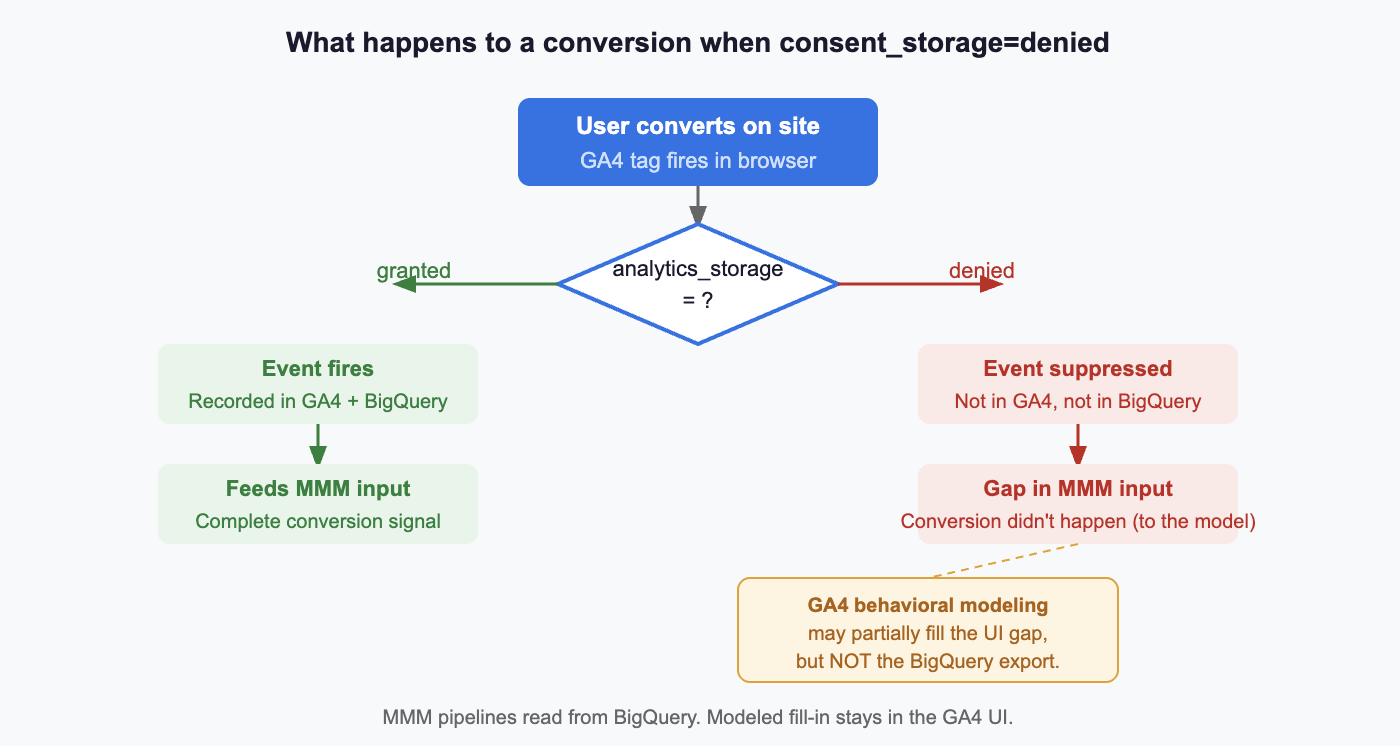
When a user opts out through your CMP or through Google’s analytics_storage=denied signal, GA4 does not record conversion events for that user. Those conversions are not captured in GA4 or its BigQuery export. From the model’s perspective, those conversions didn’t happen.
GA4 has a mechanism to partially address this: behavioral modeling. When advanced consent mode is implemented correctly, Google can estimate the activity of unconsented users and partially fill the gap in standard reports. But three conditions must all be met – and many properties don’t meet all three.
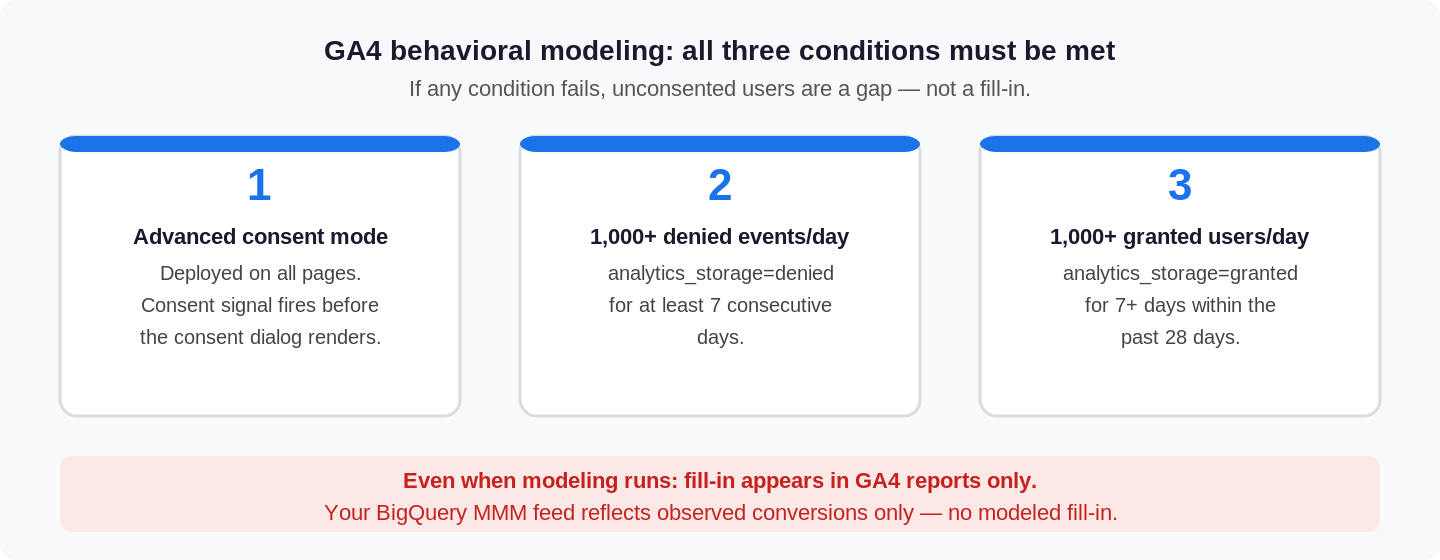
Even when those conditions are met, behavioral modeling is a reporting-layer adjustment. It does not backfill the raw event data in BigQuery. The recommended data source for MMM pipelines is the BigQuery export – and that export reflects observed conversions only, with no modeled fill-in and no warning label.
The geo-level effect
The consent gap isn’t uniform across geographies, and that matters because MMMs depend on geo-level variation to isolate channel effects.
EEA and UK users are more likely to opt out by default under GDPR enforcement. Safari users across all markets face progressively shorter cookie lifespans – even without explicitly opting out, their measurement continuity is lower. Certain verticals attract users with higher privacy sensitivity.
When conversion counts are systematically lower in certain geos – not because media performed differently, but because the measurement infrastructure captures those users less completely – the model interprets that as a real signal. Lower channel contribution gets attributed to markets with higher opt-out rates, independent of actual media performance. That error propagates into budget recommendations.
Does server-side GTM fix this?
It doesn’t – not for the consent gap.
Server-side GTM improves cookie durability by setting HTTP cookies from the server rather than JavaScript in the browser, which addresses ITP-related cookie truncation. That’s real value. But if a user has actively opted out through your CMP and analytics_storage=denied is signaled, sGTM honors that election. The conversion is not recorded. The gap persists.
Server-side tracking and consent compliance are distinct problems. Conflating them creates a false sense of measurement completeness.
What to check
Use GA4 and your CMP together to size the gap. In GA4, check whether behavioral modeling is active and compare observed performance patterns across geography, browser, and device. Then use your CMP dashboard – OneTrust and equivalents – to measure actual opt-out rates by consent category and geography. The CMP tells you where consent is being denied; GA4 helps you see where that missingness may be affecting conversion measurement.
Look for geo-level anomalies in conversion yield. In your MMM input data, look for paid media markets with weak conversion yield relative to traffic quality. Unusually low conversion rates in certain geos may reflect measurement gaps, not media underperformance. If a market looks soft in the model, check its consent opt-out rate before adjusting budget.
Verify behavioral modeling is actually running. In GA4, check the data quality icon on your reports. If thresholds aren’t met and modeling isn’t active, you’re not getting a fill-in for unconsented users – and that missingness will not surface clearly in the BigQuery dataset feeding the model.
Use CAPI and Enhanced Conversions as a parallel read. Meta CAPI and Enhanced Conversions for Google Ads can provide a parallel conversion signal that is less dependent on browser-side analytics collection. They won’t fix your GA4 BigQuery dataset, but they can help pressure-test the size of the gap before it becomes a modeling input.
Note on Enhanced Conversions for GA4. Enabling EC for GA4 changes the BigQuery export schema in ways that are not reversible – certain identifiers may be modified or omitted. If your MMM pipeline reads from BigQuery, review the schema implications before enabling it.
The bottom line
The model tells you what the data tells it. Consent mode is the right thing to implement. But the effect of that implementation on your conversion dataset should be understood and accounted for before that data becomes an MMM input.
A consent gap that looks like a 10% undercount in standard GA4 reports may not be visible at all in your BigQuery MMM feed – and a model calibrated to a 10% understated conversion baseline will produce recommendations that are wrong in the same direction, consistently, without flagging the cause.
Understand the gap before you model it away.
If your MMM depends on GA4 + BigQuery conversions, the consent gap should be quantified before the model is trusted. We help teams audit the gap, pressure-test the data, and build a cleaner signal pipeline. Contact us to start a conversation.